Most WordPress performance advice is either too vague (“use a caching plugin”) or too extreme (“rewrite your theme”). The truth sits in the middle. A typical WordPress site is slow for a handful of predictable reasons, and if you fix them in the right order you can pass Core Web Vitals without touching a line of code.
This guide covers the full stack: server, caching, CSS, JavaScript, images, and the third-party junk in between. It’s the same playbook we built into Warp Performance, and I’ll be honest along the way about what a plugin can fix and what it can’t.
First, some reality
Before the checklist, three things nobody selling you a speed plugin likes to say:
Your hosting sets the ceiling. If your server takes 2 seconds to generate a page, caching hides that for repeat views but the first visitor after every cache clear still eats it. A $3/month shared host with 200 other sites on the same box will always feel slow somewhere. Optimization multiplies what your host gives you; it doesn’t replace it.
Your theme and plugins set the floor. A page builder that outputs 400 KB of CSS and 60 DOM levels deep will never score like a lean block theme. Optimization plugins claw a lot of that back, but “maximum performance” sometimes means admitting a plugin needs to go.
Lab scores are not the goal. A 100 on PageSpeed Insights feels great, but Google ranks you on field data, the real measurements collected from Chrome users over 28 days. Optimize for real visitors and the lab score follows. Chasing the lab score directly leads to weird decisions.
With that out of the way, here’s the order of operations.
1. Get a baseline
Measure before you change anything, or you’ll never know what worked.
Run your key pages through PageSpeed Insights and note both the lab numbers and the field data at the top (if your site has enough traffic to show it). Write down LCP, INP, CLS, and TTFB.
The 2026 targets, per Google:
- LCP (Largest Contentful Paint) under 2.5 seconds
- INP (Interaction to Next Paint) under 200 milliseconds — see our complete INP optimization guide
- CLS (Cumulative Layout Shift) under 0.1
- TTFB under 800 milliseconds, though with good caching you should see far less
Re-test after each major section below. One change at a time beats flipping twenty switches and guessing.
2. Page caching, the biggest single win
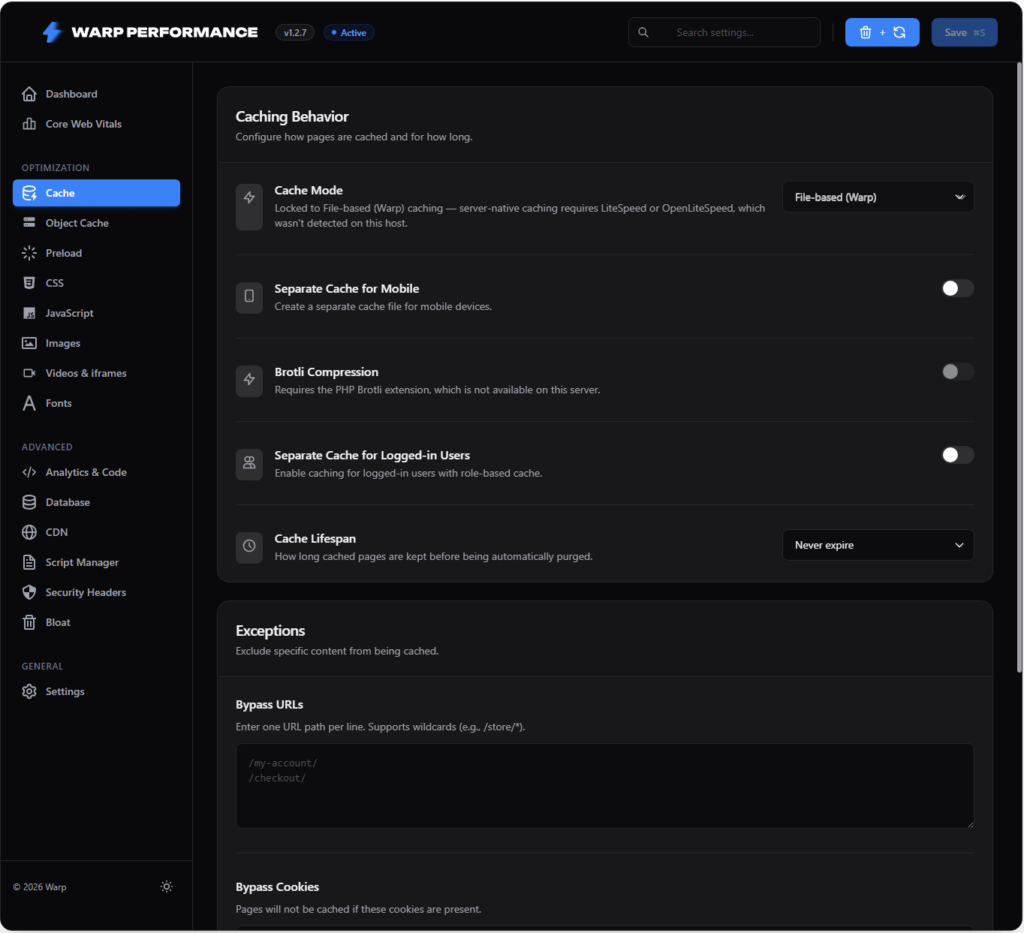
Every uncached WordPress request boots PHP, loads your theme and every active plugin, and runs dozens of database queries. On an average server that’s anywhere from half a second to two seconds of work, per visitor, for a page that hasn’t changed since last Tuesday.
Page caching writes the finished HTML to disk once and serves that copy until the content changes. TTFB drops from seconds to a few milliseconds.
Not all page caching is equal, though. The details that matter:
- The drop-in. Real page caching uses an
advanced-cache.phpdrop-in that serves the cached file before WordPress loads at all. Plugins that cache inside a WordPress hook still pay most of the PHP boot cost. - Server rewrites. On Apache,
.htaccessrules can serve cached files without invoking PHP whatsoever. That’s the fastest possible path. - A separate mobile cache. If your theme sends different markup to phones, you need a device-aware variant. Otherwise phone users get desktop HTML or vice versa. Skip this if your site is fully responsive with identical markup; an unnecessary mobile variant just doubles your cache size.
- Compression. GZIP at minimum, Brotli if your server supports it (roughly 15 to 20 percent smaller HTML).
- Exclusions. Cart, checkout, and account pages must never be cached. Any decent plugin handles WooCommerce exclusions automatically; verify it anyway by adding something to a cart in a private window.
- Purging that actually works. Updating a post should purge that URL, the homepage, and its archives immediately. Time-based expiry alone means visitors see stale content for hours.
One host-specific note: on LiteSpeed or OpenLiteSpeed servers, use a cache mode that talks to the server’s built-in cache through response headers instead of writing its own files. Running both file caching and LiteSpeed caching at once wastes disk and can serve stale pages.
Warp Performance ships with page caching, preloading, minification, and the safe exclusions enabled out of the box. The philosophy is that defaults should be the settings 90 percent of sites want, so a fresh install is already doing most of this guide before you open the settings page.
3. Object caching with Redis
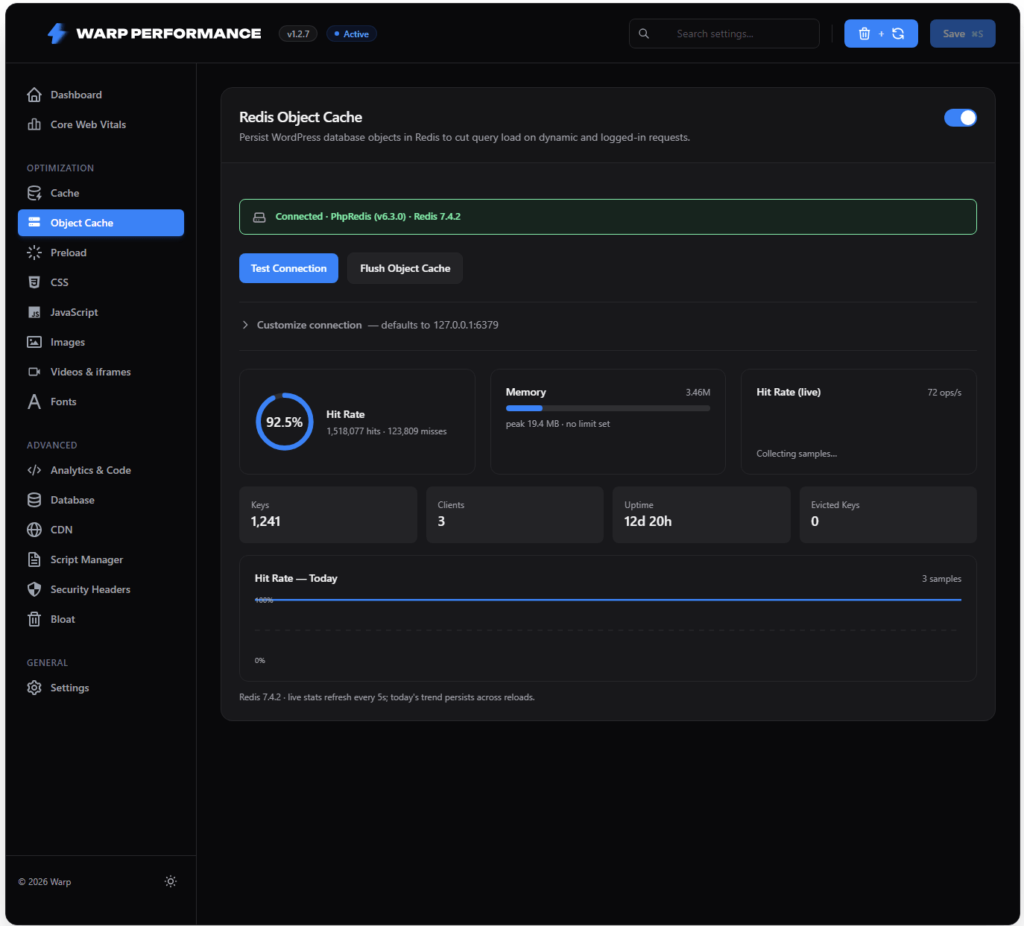
Page caching covers anonymous visitors. Logged-in users, WooCommerce carts, and wp-admin still run full WordPress on every request, and that’s where a persistent object cache earns its keep.
WordPress already caches query results and options internally, but throws that cache away when the request ends. Redis keeps it in memory across requests, so the same option lookups and term queries stop hitting MySQL over and over. The admin gets noticeably snappier, checkout gets faster, and your database stops being the bottleneck during traffic spikes.
This one is off by default in most plugins (including ours) for a simple reason: it needs a Redis server. Most managed WordPress hosts provide one in 2026. If yours does, turning it on is a five-minute win. Two settings worth knowing about: selective flushing (so clearing one site’s cache doesn’t nuke every site sharing the Redis instance) and the phpredis extension, which is much faster than the pure-PHP fallback.
If your host doesn’t offer Redis, don’t sweat it. For a mostly-anonymous-traffic site, page caching matters far more.
4. Preload the cache
A cache only helps when pages are actually in it. Without preloading, the first visitor after every purge gets the slow version, and if that first visitor is Googlebot, your crawl budget notices.
A preloader crawls your sitemap in the background and rebuilds cached pages automatically: the whole site after a Purge All, a single URL right after you edit it. The part people get wrong is throttling. Warming a 10,000-page site at full speed will flatten the same server you’re trying to protect, so preloading has to run through a rate-limited background queue. If mobile caching is on, both variants need warming.
5. CSS: minify, then remove what’s unused
CSS blocks rendering. The browser paints nothing until every stylesheet in the head has downloaded and parsed, so CSS weight translates directly into LCP.
Minification is the easy part and worth doing, but the real problem is volume. The average WordPress page loads somewhere between 50 and 200 KB of CSS and uses less than 10 percent of it. Your theme ships styles for every template, your page builder ships styles for every widget in its catalog, and your visitors download all of it on every page.
Remove Unused CSS (RUCSS) fixes this properly: analyze each page’s actual HTML, keep only the selectors that page uses, inline that small payload, and defer the original stylesheets. Render-blocking CSS goes from 150 KB across six files to maybe 15 KB inlined. On most sites this is the single biggest LCP improvement available.
It’s also the easiest optimization to get wrong, which is why some plugins have a bad reputation here. Four failure modes to check for in whatever tool you use:
- Hover and focus styles disappearing.
:hoverrules never look “used” in a static page snapshot. If the tool strips them, every button on your site stops reacting. The processor has to match pseudo-class rules against their base element instead. - Dark mode breaking. Styles keyed on
[data-theme]or a.darkclass get applied by JavaScript at runtime, so a static analysis never sees them. They need safelisting. - One global stylesheet for all pages. Your homepage and your checkout use different CSS. A single combined “used CSS” file quietly rebuilds the bloat you were removing.
- Broken pages while processing. Until a page’s used CSS is generated and verified, the full original CSS should be served, and CDNs should be told not to cache the unoptimized version in the meantime.
Warp Performance runs RUCSS through a cloud service that handles all four per URL and per device. It’s one of the few features we ship off by default, precisely because it rewrites your CSS delivery and deserves a conscious decision plus a quick click-through of your site after enabling it.
6. JavaScript: defer, delay, and be ruthless
If CSS is the LCP problem, JavaScript is the INP problem. Long main-thread tasks from analytics bundles, chat widgets, and builder runtimes are why a page can look loaded and still ignore your tap for half a second. In 2026, with INP as a Core Web Vital and ranking signal, this is where most sites fail — we break down the 5-step fix (TL;DR) and the exact code to ship.
Three levels of aggression:
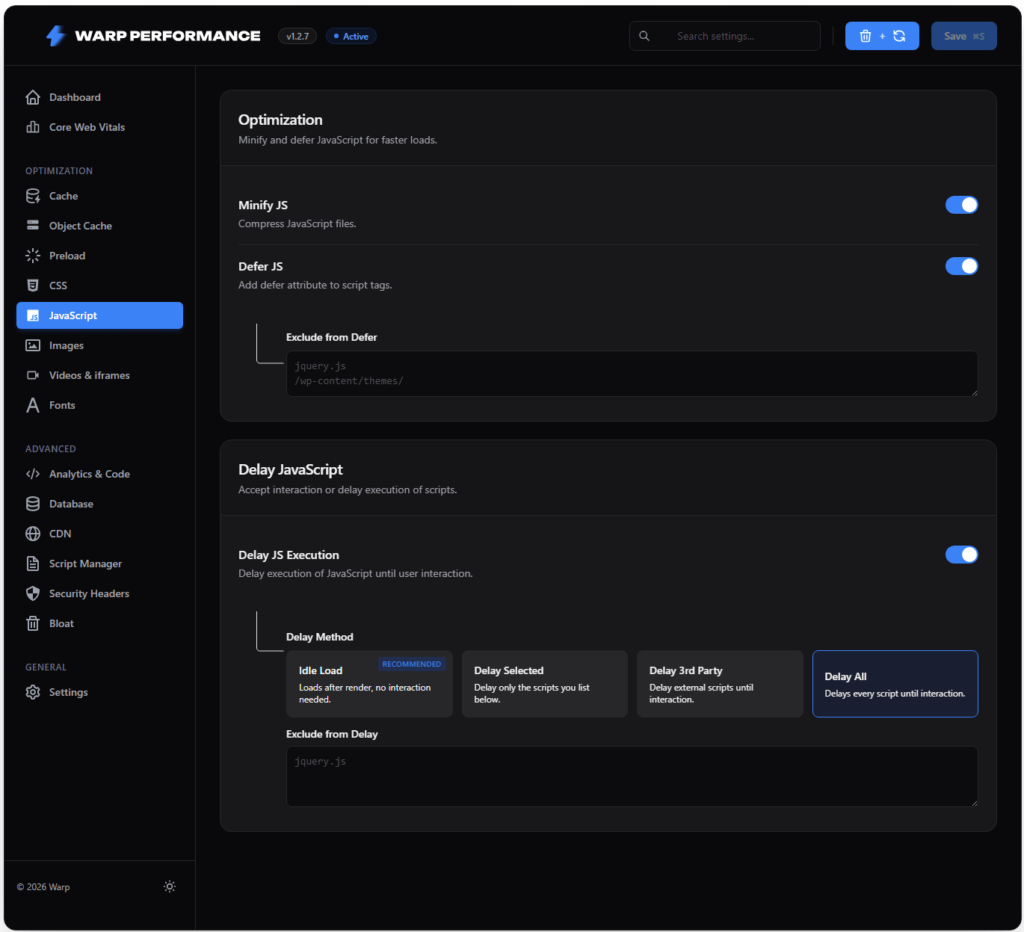
Minify. Free, small, do it. On by default in any serious plugin.
Defer. The defer attribute lets HTML parsing continue while scripts download, running them after the document is parsed. This takes scripts out of the render-blocking path with almost no risk. The rare inline script that depends on jQuery being ready needs excluding, and good plugins maintain that exclusion list for you.
Delay until interaction. This is the aggressive one, and it works. Non-critical scripts don’t load at all until the visitor scrolls, taps, or moves the mouse. Think about what’s actually on your pages: analytics, a chat bubble, a Facebook pixel, maybe an ads library. None of it contributes a single pixel to first paint. Delaying it takes hundreds of KB of JavaScript off the critical path, and both LCP and INP improve immediately.
The catch is that delay has sharp edges, and implementation quality is everything. Sliders that initialize on page load, scripts that call document.write, snippets that expect a global to exist: all of these break under naive delaying. What to look for: a real gesture trigger with a timeout fallback that applies to scripts only (delaying CSS on a timer gets you flagged by PageSpeed Insights), preserved execution order, and a maintained exclusion list with room for your own additions. Warp ships defer and delay on by default with those protections built in, because the defaults have to survive real-world themes, not demo sites.
And be ruthless. No plugin setting beats simply removing a script. Audit what’s loading with a script manager, per page. Does the chat widget need to be on your blog posts? Does the ads library need to load for logged-in editors? Unloading a script entirely on pages that don’t use it is the one JavaScript optimization with zero risk of breaking the pages that do.
While you’re at it, self-host your third-party scripts and fonts where possible. Browsers stopped sharing caches across sites years ago, so loading a library from a public CDN gains nothing and costs an extra DNS lookup and TLS handshake.
7. Lazy render what’s below the fold
Even with lean assets, the browser still runs layout and paint for your entire page, including the nine sections nobody has scrolled to yet. The CSS property content-visibility: auto tells it to skip rendering off-screen sections until they’re approaching the viewport. On long pages this cuts initial rendering work substantially.
The danger is layout shift: skip a section without knowing its height and the scrollbar jumps around as sections render in. Doing this safely means knowing each section’s real size first. Warp handles it with a small beacon that measures section heights in real visitors’ browsers, confirms a section is genuinely below the fold, and only then applies content-visibility with an accurate size reservation. This runs by default because the verification step is what makes it safe.
8. Fonts
Two problems: fonts delay text rendering, and swapping fonts shifts layout.
- Self-host Google Fonts. No shared cache benefit exists anymore, so
fonts.googleapis.comjust adds two extra connections. Serving fonts from your own domain is faster and sidesteps the GDPR issue European courts raised about Google Fonts. font-display: swap. Text shows immediately in a fallback font and swaps when the webfont arrives. No more invisible headlines.- Preload the fonts that matter. The one or two fonts used above the fold should be preloaded so they download alongside the CSS rather than after it. Automatic detection beats guessing which ones qualify.
All three are on by default in Warp, and honestly they should be in any optimization plugin. There’s no scenario where a modern site wants render-blocking third-party fonts.
9. Images
The LCP element on most pages is an image, so this section usually decides your LCP grade.
- Lazy-load below-the-fold images, and only those. Lazy-loading the hero image is one of the most common self-inflicted wounds in WordPress; it can add a full second to LCP. The plugin has to detect the LCP candidate and leave it eager.
- Preload the LCP image. A preload hint gets the hero downloading immediately instead of after CSS parsing. With a responsive
imagesrcset, the browser grabs the right size for the device. And check your page source for duplicates: two preloads of different sizes of the same image means downloading it twice, which defeats the purpose. - Width and height on everything. Missing dimensions are the number one cause of CLS. With them, the browser reserves space before the image arrives.
- Responsive sizes. A 2000-pixel image on a 400-pixel phone screen is pure waste.
- Cache Gravatars locally if you have comment-heavy pages, otherwise each thread makes dozens of requests to gravatar.com.
The safe subset (lazy loading, dimension enforcement, LCP preload, responsive images, Gravatar caching) is on by default in Warp. LQIP placeholders, the blurred previews you see on image-heavy sites, are opt-in since they’re a visual taste call.
10. Videos and iframes
A single YouTube embed pulls in roughly a megabyte of JavaScript before anyone clicks play. Most visitors never click play.
The fix is a facade: show a static thumbnail with a play button, and load the actual player only on click. Visitors who watch get a barely-noticeable extra beat; everyone else saves the whole megabyte. The same trick works for Vimeo and Google Maps embeds. Combine it with iframe lazy loading for anything below the fold, and consider lazy-loading the comments section too, since that’s often where third-party scripts and avatar requests hide.
YouTube facades and iframe lazy loading are on by default; Vimeo and Maps facades are opt-in.
11. Strip the WordPress bloat
WordPress ships some 2010-era baggage that loads on every page whether you use it or not:
- The emoji script (browsers render emoji natively now)
- jQuery Migrate (only needed by genuinely ancient plugins)
- Dashicons on the front end (only the admin bar uses them)
- Block library CSS, if you build with a page builder instead of Gutenberg
- oEmbed discovery, XML-RPC, and RSS feeds, if unused
- Unthrottled Heartbeat polling and unlimited post revisions
Each removal is small, a request here and 10 KB there, but they add up, and they’re free.
WooCommerce deserves its own paragraph because of cart fragments. The wc-ajax=get_refreshed_fragments request fires on every page view, bypasses every cache layer you’ve built, and exists to update a cart icon. Disabling it on non-shop pages (or entirely, if your theme copes) removes an uncacheable request from every page load. Woo also loads its scripts and styles on pages with zero commerce on them; unload those too.
Bloat removal is the one area where Warp intentionally defaults everything to off. Disabling XML-RPC breaks Jetpack, killing cart fragments can break certain themes’ cart icons, and removing the REST API link breaks some integrations. These are one-click toggles, but they’re your call per site, not something a plugin should assume.
12. Clean the database
Months of normal use leave debris: post revisions by the hundred, auto-drafts, trashed posts, spam comments, expired transients, and on WooCommerce, old sessions and logs. Bloated tables mean slower queries and fatter backups.
Schedule automatic cleanup by category and let table optimization reclaim the space. One warning from experience: clean expired transients only. Deleting all transients on a schedule forces plugins to constantly rebuild them, which makes the site slower, not faster.
Cleanup toggles are off by default because deleting data, even junk data, should be a decision. Also keep an eye on autoloaded options: WordPress loads every autoloaded option on every request, and one plugin storing a megabyte of data with autoload on will drag every page, cached or not.
13. CDN and edge caching
Everything so far makes your server fast. A CDN makes your server close, which matters as soon as your audience isn’t in one country.
Two tiers:
Asset CDN (Bunny is the usual pick): rewrite your image, CSS, and JS URLs to a pull zone. Cheap, simple, effective, and hard to get wrong.
Full-page edge caching with Cloudflare is the bigger prize: serving your HTML from the edge gives visitors worldwide a TTFB under 50 ms, which no origin server can match globally. It’s also the easiest way to serve stale content for hours if the integration is sloppy. The integration has to create cache rules that bypass logged-in users and WooCommerce sessions, and, critically, purge the edge in the same operation as the local cache purge. If you update a post and only the local cache clears, Cloudflare keeps serving the old version until its TTL expires. Also use a scoped API token, not the legacy Global API Key that grants your whole account.
Both integrations are built into Warp, and both are opt-in for the obvious reason that they need your account credentials.
14. Speculation Rules for instant navigation
The Speculation Rules API, supported in all Chromium browsers in 2026, lets the browser prerender the page a visitor is about to open. Hover over a link for a moment and the next page is already rendered before the click lands. Navigation feels instant in a way no amount of caching can replicate.
Warp ships this on by default with conservative eagerness and automatic exclusions for cart, checkout, and logout URLs, so speculative loads never trigger side effects. If you run custom GET endpoints that mutate state (please don’t), add them to the exclusions.
15. Watch real users, not just Lighthouse
Lab tests simulate one device on one connection, usually a fast one. Your actual visitors are on mid-range Android phones, hotel wifi, and five-year-old iPads, and Google ranks you on their experience.
Real User Monitoring closes that gap: a tiny beacon (a few KB, sent via sendBeacon, no effect on the metrics it measures) reports LCP, INP, CLS, and TTFB from every real page view, segmented by page, device, and country. That’s how you find out INP is fine on desktop but failing on mobile product pages, or that a plugin update two weeks ago quietly added 300 ms — see how to measure and diagnose INP correctly, long before the 28-day CrUX window would show it.
RUM is opt-in in Warp since it sends measurement data to our cloud. If you also want visitor analytics without the tag-manager tax, the local cookieless analytics option covers that.
A well-built plugin should get you through most of that list without opening the settings, and that’s exactly how Warp Performance is designed: the safe wins ship enabled, and the sharp tools (RUCSS, Redis, CDN, bloat removal) wait for a deliberate click. What no plugin can do is fix slow hosting or a 60,000-node DOM, so if you’ve done everything here and the numbers still disappoint, the conversation shifts to your host and your theme.
Install it, run your baseline pages through PageSpeed Insights again, and compare against the numbers you wrote down at the start. That before-and-after is the only benchmark that matters.